



Fifty million downloads on Google Play make the Livu app one of the biggest random video chat platforms in the world, but downloads don’t tell you whether an app is safe, how much it really costs, or whether the people on the other side are genuine. Here are the answers to the questions that actually matter — from getting started to knowing when to walk away.
How to Set Up Your First Call

Getting into a Livu video chat takes about two minutes from download to first conversation. Here is the exact flow:
Step 1: Download the right version. The official Livu app is on Google Play under developer Clash Arts HK Limited. If you are on iOS, use the mobile‑optimised web version — there is no dedicated iPhone app at this time.
Step 2: Complete Livu login. You can sign up with an email address, or link a Google or Facebook account for faster access. If you get a “network error” message during Livu login, uninstall and reinstall the app before trying again.
Step 3: Set your preferences before you start. Choose your preferred region and gender filters from the settings menu before tapping “Start.” The app uses these preferences to narrow the matching pool, and changing them mid‑session resets your queue.
Step 4: Understand the blur shield. When a 1v1 chat livu call connects, your face is automatically blurred. The other person sees a shielded version of your camera feed. You have to manually tap to remove the blur — and so do they. This gives both people a few seconds to assess the situation before a fully visible conversation begins.
Livu Coins: How the Pricing Works

Livu is free to download and use for basic matching. The monetisation happens through Livu coins, an in‑app currency that powers premium interactions:
- 💥 Coins drain per minute during video calls with matched users.
- 🎀 Sending virtual gifts to other users costs coins.
- 🎁 Coin packages range from smaller top‑ups to larger bundles, priced through the Google Play in‑app purchase system.
- 🤑 No permanent free coin generation — users report that there are rarely offers or ways to earn coins without paying, which means extended use requires repeated purchases.
This is the most common user complaint: Livu coins deplete faster than expected, and the free tier is generous enough to hook you, but limited enough that daily users will feel pressure to buy packs. If you plan to use Livu regularly, track your coin consumption for a week before committing to a larger bundle — it is the only way to know what your actual spend will look like.
Is Livu Actually Safe? The Honest Answer
Livu does several things right on the safety front, and a few things that need a warning label.
🫶 What works:
- The automatic blur at the start of every 1v1 chat, Livu call is a genuine privacy layer. Both people have to opt in before a clear video feed appears.
- Your call history is private — other users cannot access your past conversations or contact list.
- The in‑app reporting tool sits directly in the chat interface. Flagged accounts can be suspended.
- A dedicated safety centre at SafetyLive documents the platform’s policies and reporting procedures.
👁️ What you need to watch for:
- Scam profiles that exist purely to redirect you off‑platform. Multiple user reviews describe being asked to add contacts or visit external sites that require payment. If someone asks you to leave the app during a Livu video chat, report and skip immediately.
- Data collection. According to Google Play’s data safety section, the app collects personal information and app activity, and shares device IDs with third parties.
- No identity verification for standard accounts. The blur shield protects your privacy, but it does not verify who the other person is. Treat every new match with the same caution you would apply anywhere anonymous online.
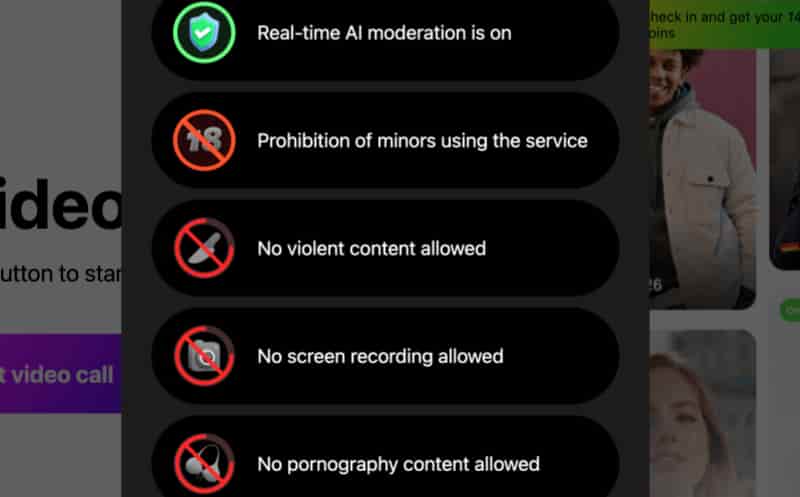
Safety checklist before each session: blur shield on, personal details off camera, and the “Next” button ready the moment anything feels off. These three habits cover more ground than any platform‑level feature.
How to Have Better Conversations on Livu
Random matching means random results, but a few habits improve the odds:
- Use the friend system. When a Livu chat clicks, add the person. You get direct video calling and unlimited text messaging with anyone on your friend list — no coins required for messages. This is the feature that turns one‑off encounters into actual connections, and it is the thing most new users overlook.
- Fill out your profile tags. The app uses interest‑based matching signals. A blank profile gets you thrown into the widest pool; a profile with clear tags and preferences narrows the field toward people you actually want to talk to.
- Start with text, switch to video. You can send messages before turning on your camera. Typing “hi, where are you from?” and getting a real reply is a fast way to filter out bots and redirect accounts before you reveal your face.
- Check the time. Peak activity on Livu aligns with evening hours in major user regions. If you match during off‑peak times, the pool is thinner and wait times are longer. Early evenings in India, Southeast Asia, and Eastern Europe tend to be busiest.
When to Switch to a Livu Alternative
Three scenarios signal it’s time to try a livu alternative:
Coin costs outpace your budget. If weekly coin spend exceeds what a monthly subscription would cost elsewhere, switch to a flat‑rate platform. Tinychat offers 1‑on‑1 matching plus group rooms with real‑time translation. Premium starts at $414/month — no per‑minute clock, no virtual currency.
Scam profiles keep appearing. If you’ve reported multiple redirect‑bait accounts and the problem persists, a better‑moderated platform is the answer. Azar adds AI content blur, a trust badge system, and 24/7 automated moderation. Video Chat Plus runs $1499/month with gender and region filters included — fewer fakes, less time wasted.
You want more discovery control. Tinychat lets you join topic‑based group rooms. Azar includes a Lounge mode for browsing profiles before connecting. Both Livu alternative picks offer structured discovery beyond swipe‑and‑hope matching.
Conclusion
Download Livu if you want a mobile‑first video chat app with a real privacy feature the auto‑blur, a working friend system, and solid translation. Stick with it if the coin costs feel manageable for how often you use it. The app that works is the one where you spend more time talking than troubleshooting. Livu earns its 50 million downloads — but whether it earns your time depends on how much of it you plan to spend there.
Frequently Asked Questions
1. How do I fix Livu login errors?
If you see a “network error” during livu login, uninstall and reinstall the Livu app. This is the most reliable fix for the issue, which tends to appear after version updates. If the problem persists, check that Google Play Services is updated on your device.
2. How much do Livu coins really cost per month?
There is no fixed monthly figure — it depends entirely on usage. Buy the smallest coin pack first and track your spending over a week. Heavy daily users can exceed $30–$50/month in coins alone.
3. Can I use Livu without buying coins?
Yes — for basic matching and short calls, you can match, chat briefly, add friends, and send unlimited text messages without spending livu coins. Extended video calls and virtual gifts require coin purchases.
4. Does the blur shield actually protect my privacy?
Yes, with a caveat. The blur activates automatically at the start of every 1v1 chat livu session, and both people must manually remove it. This prevents anyone from seeing your face without consent. However, once both people have removed the blur, the other person can screen‑record the call — no platform feature can prevent external capture.
Leave a Reply